
Main Points
- Begin with a basic design and slowly work your way up to more intricate helmets as you become more proficient.
- Select the appropriate software: Tinkercad for novices, Blender for more precise work, and Fusion 360 for advanced capabilities.
- Always use precise measurements and scale your model to guarantee a good fit.
- Reference photographs are vital for capturing the details and ensuring your cosplay helmet design is authentic.
- Avoid common mistakes by double-checking your design for mistakes and testing fit before printing.

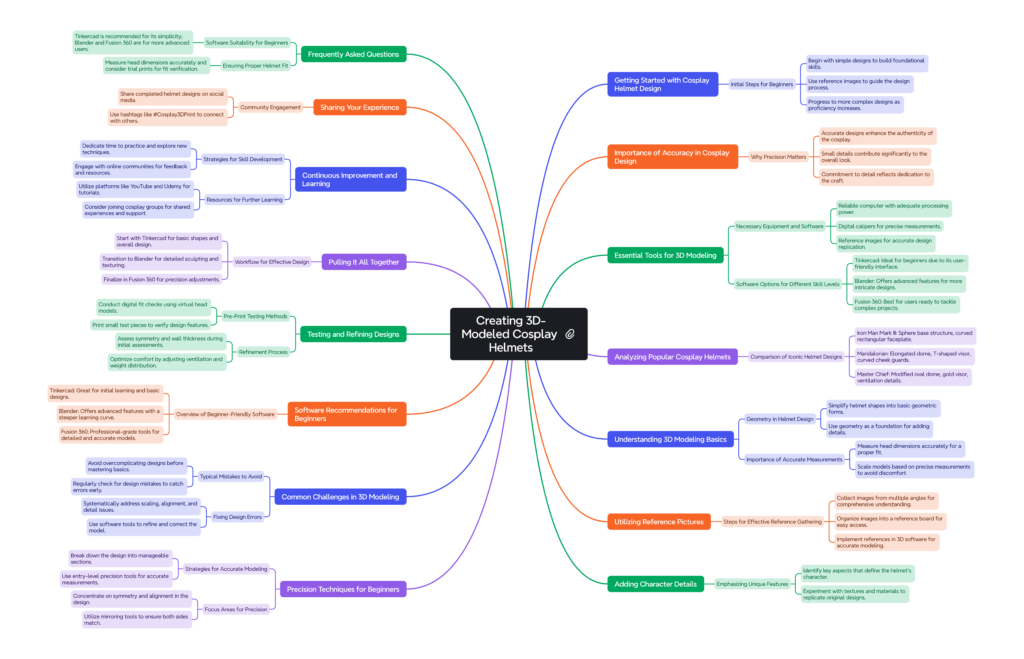
First Steps to Begin Your Cosplay Helmet Adventure
Starting the journey of creating a 3D-modeled cosplay helmet can be both exciting and a little intimidating. But don’t worry! With a few initial steps, you’ll be well on your way to creating a helmet that looks like it just came out of your favorite universe.
Start by picking a design that aligns with your skill level. If you’re a novice, it’s best to start with a simple design. This will help you learn the basics without feeling like you’re in over your head. As you become more comfortable with the process, you can start to take on more complex designs. Make sure you have plenty of reference images of the character you’re trying to recreate. These will serve as your roadmap as you go through the process.
Why Accuracy Matters in Cosplay Design
When it comes to cosplay, accuracy is king. The more detailed your design, the more your costume will stand out. It’s not just about looking good – accurate design shows your commitment to the art of cosplay. It’s the difference between a helmet that looks okay and one that truly embodies the character.
Don’t ignore the little things because they can often make the character come alive. Whether it’s the distinct shape of the visor or the particular markings on the helmet, these features are what make your cosplay unique. So, spending time on the design phase is critical for getting a top-notch result.

Essential 3D Modeling Tools for Beginners
Before you start your exciting journey into the realm of 3D modeling, there are some key tools you’ll need to collect. These tools will assist you in bringing your helmet design to fruition.
- Computer: A reliable computer with sufficient processing power and memory is essential for running 3D modeling software smoothly.
- 3D Modeling Software: Choose a program that suits your experience level and project needs. We’ll discuss specific options shortly.
- Digital Calipers: These are useful for taking precise measurements, ensuring your model fits as intended.
- Reference Images: Gather high-quality images of your character’s helmet from different angles for accurate design replication.

Overview of Beginner-Friendly Software Options
Choosing the right software is a pivotal step in your 3D modeling journey. The software you select should align with your skill level and the complexity of your project.
If you’re a newbie, Tinkercad is a great option. It’s easy to use and has a simple interface that allows you to grasp the fundamentals without getting overwhelmed. As you get more adept, you may want to try out Blender. This program has more sophisticated features for intricate designs. Lastly, Fusion 360 is perfect for those who are prepared to tackle more difficult tasks, providing a variety of professional tools to perfect your models. For advanced users, exploring PARTTWO can offer additional insights and techniques.
Popular Cosplay Helmet Examples and Modeling Approaches
Here’s a table comparing the key components of the Iron Man Mark III, Mandalorian, and Master Chief helmets:
|
Component |
Iron Man Mark III |
Mandalorian |
Master Chief (Halo) |
|---|---|---|---|
|
Base Structure |
Sphere |
Elongated dome |
Modified oval dome |
|
Visor/Faceplate |
Curved rectangular faceplate |
T-shaped visor (extruded rectangle) |
Gold visor (curved rectangular shape) |
|
Side Panels |
Curved triangular shapes |
Panels with rangefinder |
Angular side panels |
|
Back Piece |
Rounded dome |
Part of the elongated dome |
Back protective plate |
|
Distinctive Features |
Eye slits, cheek indentations, jawline |
Curved cheek guards, angular cuts |
Ventilation system details |
|
Additional Components |
– |
Side rangefinder |
– |
This table provides a concise comparison of the basic structures and key components of each helmet, highlighting their unique features and design elements.
Getting to Grips with the Basics of 3D Modeling for Helmets
Before you jump in and start designing your helmet, you need to get your head around the basics of 3D modeling. Knowing these fundamentals will provide the groundwork for all your future projects.
Understanding the Geometry of Helmets
Geometry is the key when it comes to modeling a helmet. Begin by simplifying the helmet into basic shapes. You’ll find that most helmets can be distilled down to simple geometric shapes such as spheres, cylinders, and cones. Once you’ve established the basic form, you can start to layer in the details to make the design pop.
Imagine the helmet as a jigsaw puzzle. Every piece connects to form the final image. By knowing how these pieces connect, you can make a model that is precise and visually stunning.

The Significance of Accurate Measurements and Scaling
Getting your measurements right is essential in 3D modeling. If your helmet isn’t the right size, it won’t fit, which can be very disappointing after you’ve spent hours working on your design. So, be sure to measure your head accurately and scale your model to match.
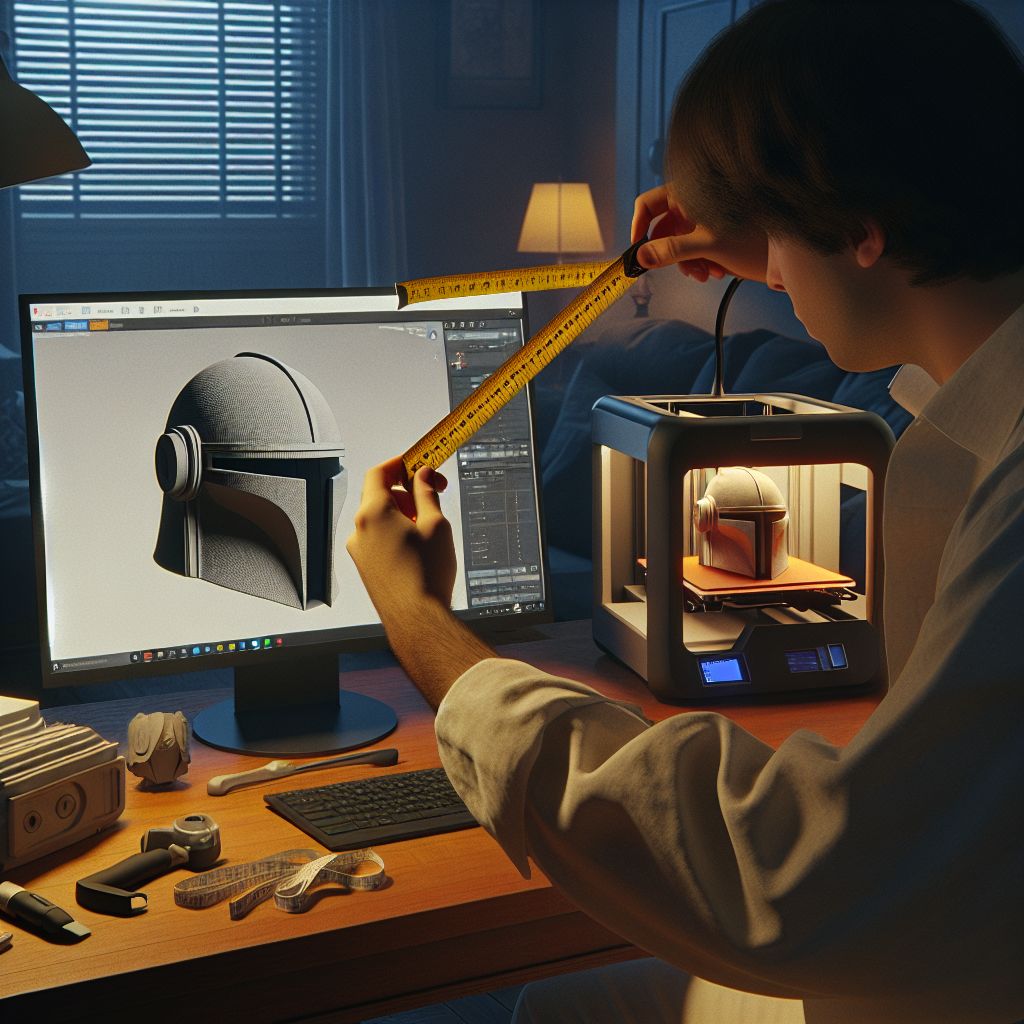
Take your head’s circumference, height, and width measurements using digital calipers. Enter these measurements into your modeling software to scale your design properly. This will guarantee a comfortable fit and avoid any discomfort while wearing the helmet.
Consider this: you’re designing a helmet for a character like Iron Man. His helmet has a unique shape that envelops the head. Precise measurements are key to making sure your model both maintains the character’s signature look and fits comfortably.
Using Reference Pictures for Detailed Design
Reference pictures are indispensable when designing a cosplay helmet. They offer a visual guide to assist you in capturing the character’s essence and reproducing it precisely. Collect pictures from various angles to comprehend the helmet’s shape and details.
The pictures will help you position features such as air vents, visors, and any distinctive marks. They also assist in keeping your design consistent, ensuring that the final product looks like the character’s helmet.
|
Step |
Action |
Details |
|---|---|---|
|
Step 1: Gathering References |
Collect various view images |
• Front, side, back, and 3/4 view images |
|
Step 2: Image Organization |
Create a comprehensive reference board |
• Compile all views |
|
Step 3: Reference Implementation |
Import and set up reference images in 3D software |
• Import reference images into your 3D software |
|
Step 4: Measurement Mapping |
Scale and mark references |
• Scale references to actual size |
Studying Your Inspiration
Before you can start crafting your cosplay helmet, you need to do your homework on the character you’re trying to recreate. This means collecting as much visual and written data as you can find. Look to comics, movies, TV shows, and video games for a wealth of information and inspiration.
Try to find high-resolution images that show the helmet from different angles. Look for any distinctive features, colors, and textures that make the helmet unique. This research stage is important because it provides the foundation for your design process, making sure you have a thorough understanding of what you’re trying to make.
Adding Character Details to Your Design
When you have a good understanding of your character’s helmet, you can start adding these details to your design. Begin by figuring out the most important aspects of the helmet. Is it the shape, color, or specific markings that make it stand out? Make sure to emphasize these aspects in your model.
Don’t be afraid to play around with your 3D modeling software to add textures and details that resemble the original design. If the helmet has a glossy finish, for example, try out different materials in your software to replicate that look. Keep in mind that it’s the little things that count, so be patient and make sure every element is depicted accurately.

Beginner’s Guide to Precision Techniques
When it comes to creating a great cosplay helmet, precision is key. Beginners should concentrate on developing their skills and using the correct tools. Even basic techniques can make a big difference in the accuracy of your model.
A good strategy is to divide the design into smaller, more manageable parts. Concentrating on one section at a time allows you to make sure each part is carefully made before proceeding to the next. This method also makes it simpler to spot and fix any errors early on in the process.

Starting with Basic Precision Tools
You don’t have to break the bank on expensive tools to get started. Entry-level precision tools are an affordable and effective starting point. Digital calipers, for example, are great for taking exact measurements to ensure the dimensions of your model are accurate.
Furthermore, think about using features in the software like grid-snapping and alignment tools. These features can help keep your design consistent, make it simpler to line up different parts and guarantee they fit together without any issues.
What to Concentrate On for Precision
When aiming for precision in your cosplay helmet, concentrate on features that are most noticeable and characteristic of the original design. This includes the overall form, any unique patterns or textures, and the positioning of elements like visors and vents.
Be sure to focus on symmetry because most helmets are created to be symmetrical. Use the mirroring tools in your software to duplicate features from one side to the other, making sure both sides of the helmet are the same. This not only makes it look better but also helps make your model more accurate.
Troubles You Might Face and How to Dodge Them
When you start your 3D modeling adventure, you should know the typical troubles that might slow you down. If you comprehend these difficulties, you can act in advance to dodge them and guarantee a more streamlined design process.
One common mistake is making the design too complex too soon. Beginners usually try to add complex details before they have a solid base. Instead, you should concentrate on getting the basic shape and structure correct before you move on to the finer details.
Spotting and Correcting Design Mistakes
Mistakes in your design can pop up at any point in the modeling process, but catching them early can save you a lot of time and aggravation. Make sure to frequently check your model for any issues or mistakes, like uneven surfaces or elements that aren’t lined up properly.
Don’t be afraid to backtrack if you notice an error. It’s always better to fix it early on instead of letting it ruin your finished product. Take advantage of the analysis tools in your software to spot areas that could use some refining and tweak your model as needed.
Fixing Common Modeling Errors
Even with the best planning, things can go wrong. Common problems include incorrect scaling, poor alignment, and not enough detail. When fixing these issues, use a step-by-step process to find the root cause and come up with a solution.
For example, if your model isn’t scaling correctly, go back to your measurements and make sure they are accurately reflected in your design. If alignment is off, use alignment tools to put elements in the right position. By systematically addressing each problem, you can overcome challenges and achieve a polished final product.
3D Modeling Software for Beginners
It’s important to pick the right 3D modeling software when you’re just starting out. The right software can make learning more fun and less intimidating. Here are some options that are great for beginners:
If you’re just getting started with 3D modeling, Tinkercad is a fantastic place to begin. The user-friendly interface and uncomplicated tools allow you to get a grasp of the basics without feeling swamped. As you become more comfortable, you can start experimenting with more intricate features and designs.
For those who are ready to take their 3D modeling skills to the next level, Blender is a great choice. While it’s a bit more challenging to learn, there are plenty of tutorials and resources available to help you get the hang of it.
Lastly, for those who are ready to take their skills to the next level, Fusion 360 is a perfect choice. This software comes with professional-grade tools and features that enable you to make very detailed and accurate models. It’s a potent tool for those who are prepared for more complex projects.

Getting Started with Tinkercad
If you’re just getting started with 3D modeling, Tinkercad is a great place to start. It’s easy to use, even for beginners, and it doesn’t require any special software – you can use it right in your web browser. Plus, it’s got all the tools you need to start designing right away.
What makes Tinkercad stand out is its ability to use simple geometric shapes to make more intricate designs. This method makes the modeling process a breeze, allowing beginners to grasp and utilize basic concepts. As you get the hang of it, you can explore more sophisticated features like custom shapes and imported models.
What Blender Offers for Newbies
Blender is a great next step for those who have mastered the basics and are ready for more. It’s a bit more challenging to learn than Tinkercad, but the vast range of features makes the effort worthwhile. Plus, Blender is open-source and free so that anyone can use it.
If you’re starting out, Blender has plenty of tutorials and community resources to help you learn the ropes. It comes with detailed sculpting tools, advanced texturing options, and a powerful rendering engine. You can use these features to make highly detailed and realistic models, which are great for making your cosplay helmets come alive.
Improving Designs with Fusion 360
If you’re looking to step up your 3D modeling game, Fusion 360 is the way to go. This software provides a full range of tools for crafting detailed and accurate designs. While it’s a step up from Tinkercad and Blender in terms of complexity, its professional-level capabilities make it a great option for dedicated hobbyists and professionals.
With Fusion 360, you can use parametric modeling to create models based on exact parameters and easily make adjustments as needed. This is especially useful for ensuring your helmet design is a perfect fit. Plus, Fusion 360’s cloud-based platform makes collaboration easy, so you can share your designs with others and get feedback.
Testing and Refining Your Design
|
Process |
Step |
Details |
|---|---|---|
|
Pre-Print Testing |
Digital Fit Check |
• Use digital head models for initial fitting |
|
Sectional Printing |
• Print small test pieces of complex areas | |
|
Scale Model Testing |
• Print a 25% scale model first | |
|
Refinement Process |
Initial Assessment |
• Check for symmetry issues |
|
Comfort Optimization |
• Add padding points | |
|
Final Adjustments |
• Fine-tune surface finish |
Pulling It All Together
With the knowledge and skills you’ve acquired from working with Tinkercad, Blender, and Fusion 360, you can craft a cosplay helmet that is both precise and visually impressive. Each program has its own special features that, when used in combination, can enhance your overall design experience.
Start off by doodling your design in Tinkercad, a platform where you can play around with basic shapes and get a sense of the big picture. When you’re happy with the base, bring your model into Blender for the details. Use Blender’s sculpting and texturing tools to include detailed elements and make your helmet come alive.
Lastly, fine-tune your design in Fusion 360. It uses precision tools to guarantee that all parts fit together perfectly and adjusts the dimensions as needed. Following this workflow allows you to take advantage of the strengths of each software to achieve the best possible result.
Advice for Improvement and Development
Like all skills, the secret to becoming proficient at 3D modeling is practice. Dedicate a portion of your week to advancing your projects and discovering new methods. Don’t shy away from trying new things and making errors, as these are the most effective learning experiences. For those looking to enhance their skills, consider exploring advanced 3D modeling techniques available online.
Join online communities and forums to meet other cosplayers and 3D modeling fans. These platforms are great places to find tutorials, share your work, and get feedback from others who are passionate about the same things.
Lastly, push your limits by tackling more complex projects. As your skills get better, you’ll discover that you can handle more detailed designs and make even the most ambitious cosplay ideas a reality.
Where to Learn More
If you’re interested in learning more about 3D cosplay Helmet modeling, there are tons of resources out there that can help. Websites like YouTube and Udemy have a wealth of tutorials and courses on all kinds of 3D modeling topics. They’re a great way to learn new techniques and improve your skills.
3D modeling and cosplay design books and eBooks are great resources as well. They provide detailed information on techniques and best practices and can also give you ideas for new projects. Think about joining local or online cosplay groups to meet others with the same interests and share your experiences.
Share Your Experience
We hope this guide has inspired you to create your own unique cosplay helmets. Share your experiences, ask questions, and post photos of your completed helmets on social media using #Cosplay3DPrint.
If you found this guide helpful, please share it with your friends and fellow cosplayers. Subscribe to our social accounts, Facebook Group & newsletter for more tutorials and tips.
Common Questions and Answers
If you’re just starting out with 3D modeling for cosplay helmets, you might have a few questions. Here are some answers to common questions that beginners often ask.
Which Software is Most Suitable for Beginners?
The most suitable software for beginners really depends on what you need and how skilled you are. Tinkercad is perfect for beginners because it’s simple and easy to use. As you become more experienced, you might want to switch to Blender or Fusion 360, which have more advanced features and give you more flexibility in your designs.
In the end, the best choice is the one that meets your needs and allows you to bring your designs to life. Try out different software to find the one that fits you best.
How Can I Make Sure My Helmet Fits Right?
Getting the right fit is important for both comfort and accuracy in your cosplay helmet. Begin by taking accurate measurements of your head using digital calipers. Enter these measurements into your 3D modeling software to scale your design accurately.
Think about doing a trial print of your helmet using a lower-grade material or a smaller scale to check the fit before you go all in on the final print. This gives you the chance to make any needed changes without wasting time or materials.
Keep in mind that a helmet that fits well not only improves the overall look of your cosplay but also makes sure you can wear it comfortably for long periods of time.
These tips and resources will set you up for success as you dive into 3D modeling and start creating cosplay helmets that truly embody your favorite characters. Remember to enjoy the process and have fun realizing your creative visions!


Leave a Reply